







Sales teams today rely heavily on data, timing, and relationships to close deals faster. However, switching between multiple tools to gather prospect information often slows productivity and breaks sales momentum. This is where Salesforce and LinkedIn Sales Navigator integration becomes a game-changer.
By connecting your CRM with the world’s largest professional network, you allow your sales team to access real-time prospect insights, relationship data, and lead recommendations directly inside Salesforce. In this guide, we’ll explain what the integration is, how it works, its benefits, best practices, and how businesses can use it to improve sales performance
What Is Salesforce and LinkedIn Sales Navigator Integration?
Salesforce and LinkedIn Sales Navigator integration allows sales professionals to view LinkedIn data within Salesforce CRM records.
Instead of opening multiple tabs or manually researching prospects, sales representatives can:
- View LinkedIn profiles inside Salesforce
- See job changes and company updates
- Discover mutual connections
- Track LinkedIn interactions
- Receive intelligent lead recommendations
All of this happens within their existing CRM workflow. The result is a faster, more informed, and relationship-driven sales process.
How the Integration Works
The integration works through embedded widgets and CRM sync features that connect Salesforce data with LinkedIn Sales Navigator.
1. Embedded LinkedIn Insights in Salesforce
Once connected, LinkedIn Sales Navigator panels appear inside:
- Lead records
- Contact records
- Account pages
- Opportunity pages
Sales reps can instantly see:
- Professional background
- Current role
- Company information
- Mutual connections
- Recent activity
2. CRM Data Synchronization
Salesforce records sync with Sales Navigator, ensuring both platforms remain updated with the same contacts and accounts.
This helps eliminate duplicate data and ensures accurate lead matching.
3. Suggested Leads and Account Intelligence
Sales Navigator uses LinkedIn’s data combined with your CRM data to recommend:
- New potential leads
- Decision makers in target accounts
- Similar prospects based on previous wins
This helps teams prioritize high-value opportunities instead of cold searching.
4. Activity Logging
LinkedIn interactions such as InMails and profile views,s can be logged back into Salesforce, keeping engagement history centralized.
Key Benefits of Salesforce and LinkedIn Sales Navigator Integration
Improve Your Salesforce Experience
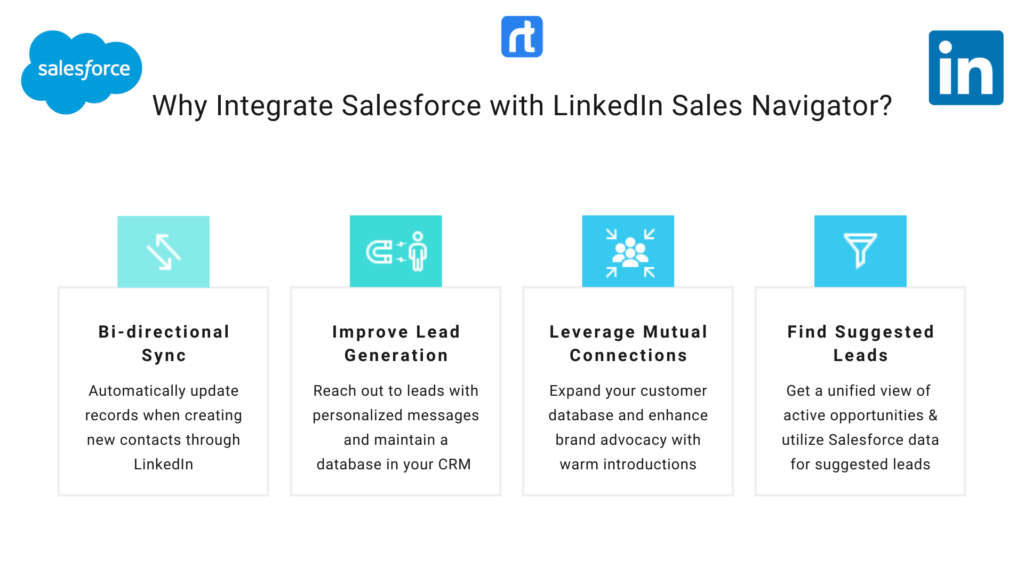
LinkedIn Sales Navigator and Salesforce integration will improve your Salesforce Experience with actionable and accurate data insights. It allows sales reps to stay updated with the relevant news and activities of different prospects. Moreover, you can also get key insights about leads to build personalized customer relationships by keeping track of their activities on LinkedIn.
Find Suggested Leads in Sales Navigator
Streamline your sales pipeline by connecting Salesforce to LinkedIn Sales Navigator by automatically importing lead, contact, opportunity, and account records into the LinkedIn Sales Navigator. This will give you a unified view of all your active opportunities and ensure that all changes are updated in real-time in your CRM platform. Sales Navigator will also utilize your Salesforce data and will then show you suggested leads based on that data.
Bi-Directional Sync
Connect Salesforce to LinkedIn Sales Navigator to automatically update records through LinkedIn InMails, messages, calls, and notes in Salesforce for a seamless experience. It allows you to log key sales navigator actions in Salesforce when creating new contacts and assigning roles for new opportunities.
Improved Lead Generation
Get high-quality leads through LinkedIn Sales Navigator and determine their quality against a set of parameters. With Salesforce and LinkedIn Sales Navigator integration, you can easily reach out to leads with personalized messages and maintain a database in your CRM to leverage it as the best lead management software.
Leverage Mutual Connections
Salesforce and LinkedIn Sales Navigator integration lets you stay ahead of the curve by leveraging personalized marketing campaigns. It also lets you utilize your mutual connections so you can get warm introductions to reach out to the leads, expand your customer database, and enhance your brand advocacy.
Salesforce Customization and Configuration Services
How to Leverage Salesforce to Fully Boost Your Sales?
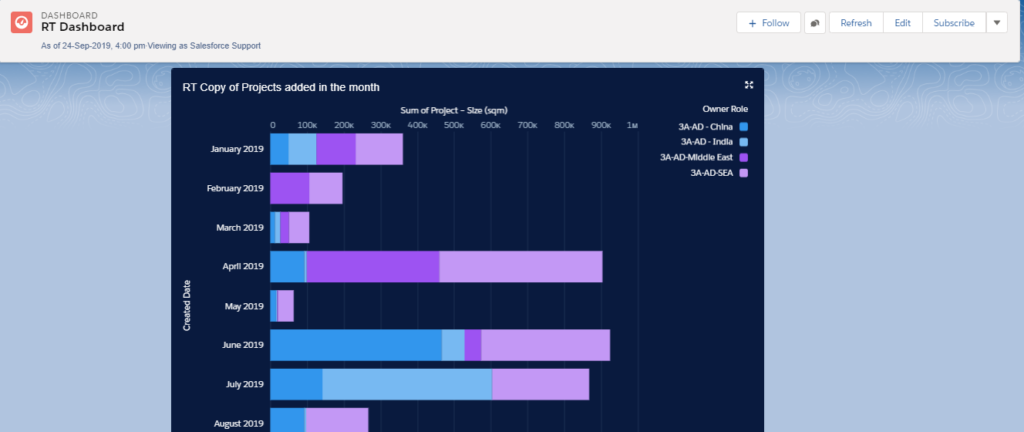
With all this data, what you really need is a Customized Salesforce Dashboard to make sense of it all, and also to optimize sales management processes and drive high profits. As per our research, companies using Salesforce Customized Dashboards see their business growth skyrocket.
Let’s dive in to see how Salesforce Customized Dashboards can help your business.
Salesforce Customized Dashboards For Opportunities
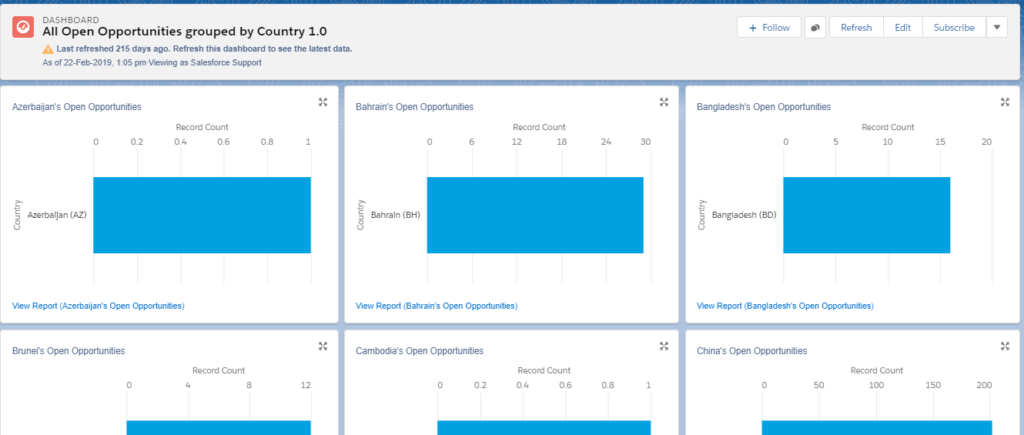
With Salesforce Customized Dashboards, you can get a 360-degree view of your sales pipeline. This means you can get a clear idea of all open opportunities that you can avail to boost sales and grow your business.
Rolustech has extensive experience in creating Salesforce Customized Dashboards for opportunities. The custom dashboard is user-interactive and allows users to filter their data by different parameters such as countries, revenue, etc. Moreover, the Salesforce Dashboard for opportunities allows sales reps, managers and executives to keep track of all opportunities and drive high sales.
Keep Track of Results and Issues
As the Salesforce Customized Dashboard for opportunities gives a complete overview of your sales pipeline, it allows you to seamlessly manage your sales. Stay updated with your leads and opportunities by having a quick glimpse of all issues, conversions, results, and updates.
Stay on Top of Your Sales Pipeline
Many companies are already leveraging Salesforce Customized Dashboard and have seen high growth in their sales figures. Along with this, the customized dashboard for sales also helps to boost team productivity and make better decisions.
Best Practices for Salesforce + LinkedIn Sales Navigator Integration
Clean Your CRM Data First
Ensure contacts and accounts are accurate to avoid incorrect matches.
Train Sales Teams Properly
Teach reps how to:
- Use embedded LinkedIn panels
- Interpret engagement signals
- Leverage relationship paths
Define Lead Qualification Rules
Align suggested leads with your ICP and sales strategy.
Track Performance Metrics
Monitor:
- Opportunity creation
- Conversion rates
- Engagement activity
- Sales cycle length
This helps optimize usage over time.
Challenges to Be Aware Of
While powerful, businesses should consider:
- Sales Navigator licensing costs
- User adoption challenges
- Data privacy policies
- Initial configuration complexity
Rolustech is an Official Salesforce Partner firm and has completed more than 700 projects in Salesforce Implementation, Customization, Integration, and more. Contact us now for a FREE Business Analysis. We will be glad to assist you!